
Sizely
Real-scale preview before you print.
Sizely shows 3D-printable models in augmented reality through a Meta Quest headset, and lets you handle, paint, measure and resize them. Check size, proportions and fit without wasting filament or resin.
- Free of charge
- Open source, GPL-3.0
- Windows 10 and 11
- Meta Quest
- English and Italian
The program is new and not signed yet: your browser may warn that the file is not commonly downloaded (from the arrow next to "Delete", choose "Keep anyway") and Windows may show "Windows protected your PC" (choose "More info", then "Run anyway").
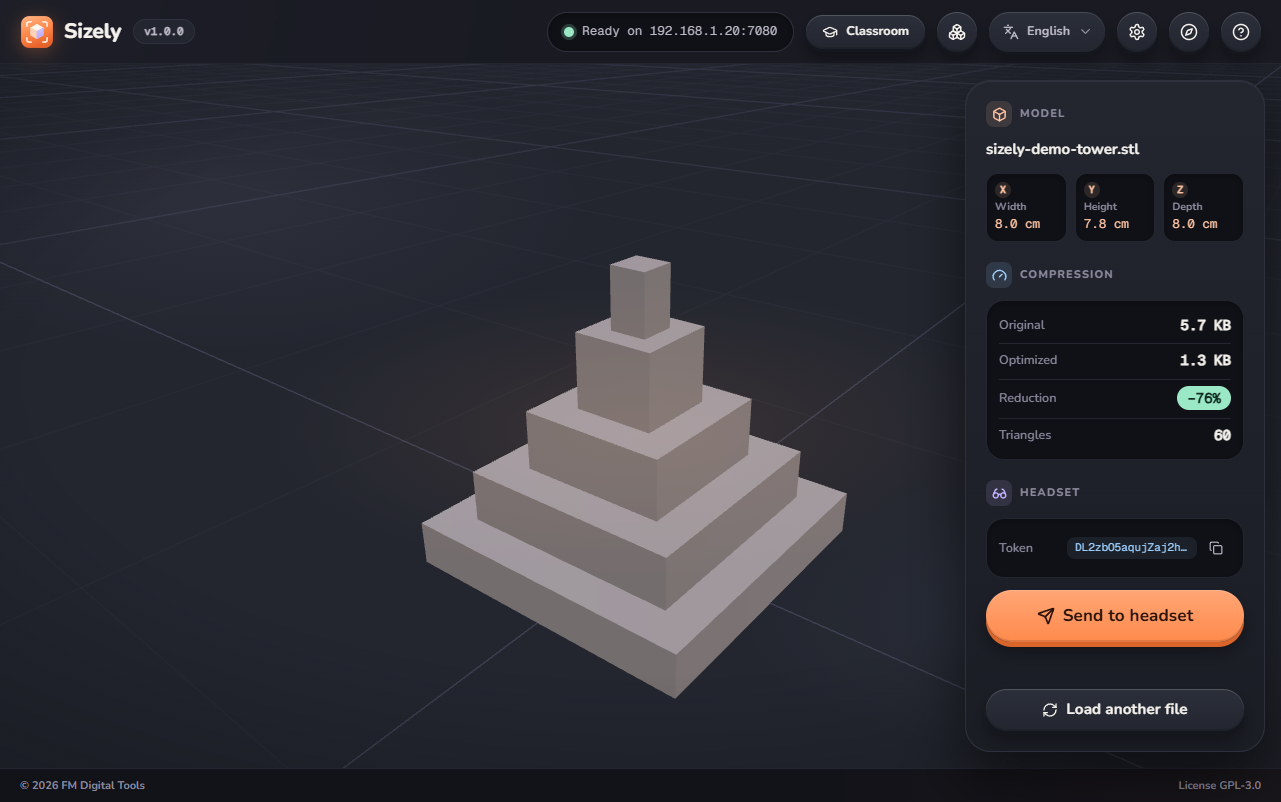
From file to room in four steps
The PC converts the model and sends it directly to the headset, over the local network you already use.
Load
A STL, OBJ or 3MF file dropped in the app is converted and optimized on the PC. Colored 3MF files keep their colors.
Connect
The Sizely Launcher finds the PC with one tap; otherwise, type an address in the headset browser.
Send
On the PC, type the pairing code shown in the headset, and the model opens on the headset.
Place
Point the headset at a surface and bring thumb and index finger together: the model appears at real size.
Every tool, right in AR
Use your hands or the controllers, with a panel that follows the model and can be moved wherever you prefer.
Resize
Pinch with both hands on each side of the model to try another size, with the uniform scale shown live. Measure updates sizes and volume, and Reset brings the model back to its original size. The file is not changed.
Real 1:1 scale
The model appears at its actual size, on tables, shelves, floors and walls.
Grab and move
With one or two hands, like a real object, or with the controllers.
Paint
Brush, fill and eraser, with 16 colors. Paint is saved on the PC and restored when the model is opened again.
Measure
Width, height and depth in millimeters, and the volume in cm³, over the model.
3MF file colors
Filaments and faces painted in Bambu Studio, Orca Slicer and PrusaSlicer are kept.
Two languages, always
English and Italian, with the language switch available at any moment, even in AR.
Sizely Launcher: one tap, no address
A small app for the headset, included with Sizely, finds the PCs with Sizely open on your network and opens the chosen one in the headset browser. It is installed once with SideQuest, after turning on the developer mode of the headset. The guide explains every step.
Classroom mode
Designed for classes and labs: each PC connects to one headset at a time with a code, and any headset can be used by any student. Models stay on the PC and are not saved on the headset.
Guide and tour included
A guided tour on the first start shows the functions on the real controls, and a complete guide in English and Italian is available in the app, on the headset and in the Launcher.
Formats
- STL
- OBJ
- 3MF, with colors
- Up to 250 MB per file
Privacy
- No account
- No usage statistics or advertising
- Models and paint stay on the PC
- Update check off by default
Requirements
- Windows 10 or 11, 64-bit
- Meta Quest 3, 3S or Pro; Quest 2 with some limitations
- PC and headset on the same local network
Free, and it will stay free
If you want to support development, you can contribute on Ko-fi.